
Send job applications directly from Gmail.
The companion extension that puts your personalized job outreach, recruiter contacts, and scheduled sends directly into Gmail. Inspect every draft, send with 1 click, and never miss an opportunity.
Get Started in 60 Seconds
How to install the Apply Ops Extension
Add directly from the Chrome Web Store. Compatible with Chrome, Brave, Arc, Microsoft Edge, and all Chromium browsers.
Open Web Store
Click the official Chrome Web Store link below and select "Add to Chrome".
Pin to Toolbar
Click the puzzle icon in Chrome and pin Apply Ops for easy quota and balance access.
Open Gmail
Navigate to Gmail. The Apply Ops companion sidebar automatically displays your tailored campaigns.
Extension Capabilities
Built for serious job seekers who value quality over spam.
In-Gmail Outreach Cockpit
Drafts tailored from your parsed resume and company match criteria appear right in your Gmail sidebar ready for 1-click send.
Timezone-Smart Scheduling
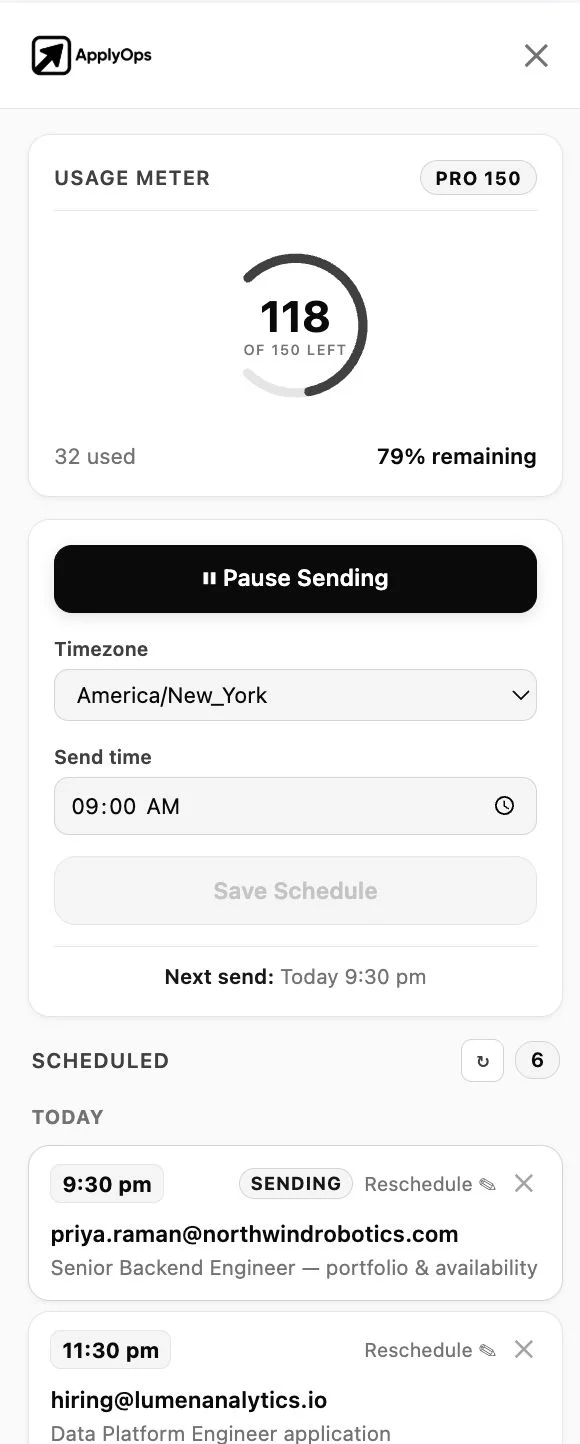
Queue applications to deliver during working hours in the recruiter's local timezone (e.g., 9:00 AM EST) to maximize open rates.
100% Human Review Safety
Inspect every variable, line of copy, and attachment before anything leaves your mailbox. Zero blind spam bot hazards.
Live Credit & Quota Counter
Instant visibility into remaining search credits and daily sending limits from the toolbar popup or Gmail sidebar header.
Zero-Password Token Bridge
Authenticates via encrypted browser session relay directly from your active Clerk dashboard login.
Unified Pipeline Sync
Sending an email from Gmail automatically updates your central application tracker in the dashboard.
Why It Works
The difference between an interview and a spam folder.
Mass-apply bots spray hundreds of identical submissions that recruiters delete on sight. Apply Ops combines surgical targeting with authenticated personal outreach.
| Feature / Metric | Apply Ops Extension | Generic Auto-Apply Bots |
|---|---|---|
| Delivery Method | Directly from your verified Gmail account | Unverified third-party relay servers (often flagged spam) |
| Draft Transparency | Full inline preview & manual edit support | Black-box automatic firing without inspection |
| Account Safety | 100% compliant with Gmail & job board API policies | DOM-scraping scripts that cause platform bans |
| Personalization Quality | Deep matching using candidate parsed resume + JD | Static copy-paste templates with blank placeholders |
| Browser Performance | Lightweight Manifest V3 with minimal resource footprint | Heavy background scraping pollers that drain battery |
In-Depth Guides
Explore dedicated extension workflows
Learn how to leverage browser extensions for specific outreach strategies and job search automation.
Our Security & Privacy Commitment
We built Apply Ops with strict adherence to Google's API User Data Policy and Chrome Web Store Security Standards:
Frequently Asked Questions
Everything you need to know
What does the Apply Ops Chrome extension do?
The extension integrates Apply Ops directly into Gmail. When you find matching roles and generate recruiter outreach on Apply Ops, the extension populates personalized drafts right inside your Gmail sidebar, letting you review, edit, and send or schedule them without leaving your inbox.
Is the extension free to use?
Yes. The Chrome extension is free to install and use with your Apply Ops account. Free tier users get complimentary credits to test resume matching and recruiter outreach immediately.
Does the extension send emails automatically without my review?
No. Safety is our core priority. Every single email draft is reviewable in the Gmail composer before anything is sent. You can edit the text, change recipient fields, or delete drafts at any time.
Which browsers are supported?
The extension is built on Google's modern Manifest V3 standard and is fully compatible with Google Chrome, Brave, Arc, Microsoft Edge, Opera, and any other Chromium-based browser.
Why does the extension require Gmail permissions?
The extension requests minimal permissions to interact with `mail.google.com` so it can render the companion sidebar and create outreach drafts in your composer. We never read, index, or store your private incoming mail.
How do I log into the extension?
Simply sign in to your Apply Ops account at applyops.in. Our secure auth bridge automatically synchronizes your session token with the extension in real time, no manual API keys required.
Get in front of the person who decides.
Upload a resume, pick your boards, and start sending verified, personalised cold email from your own Gmail. Free to start, no card.